Personas
Create and manage personas (name, description, avatar) and choose who you are when starting a new chat.
Personas Dashboard
Manage all your personas in one place
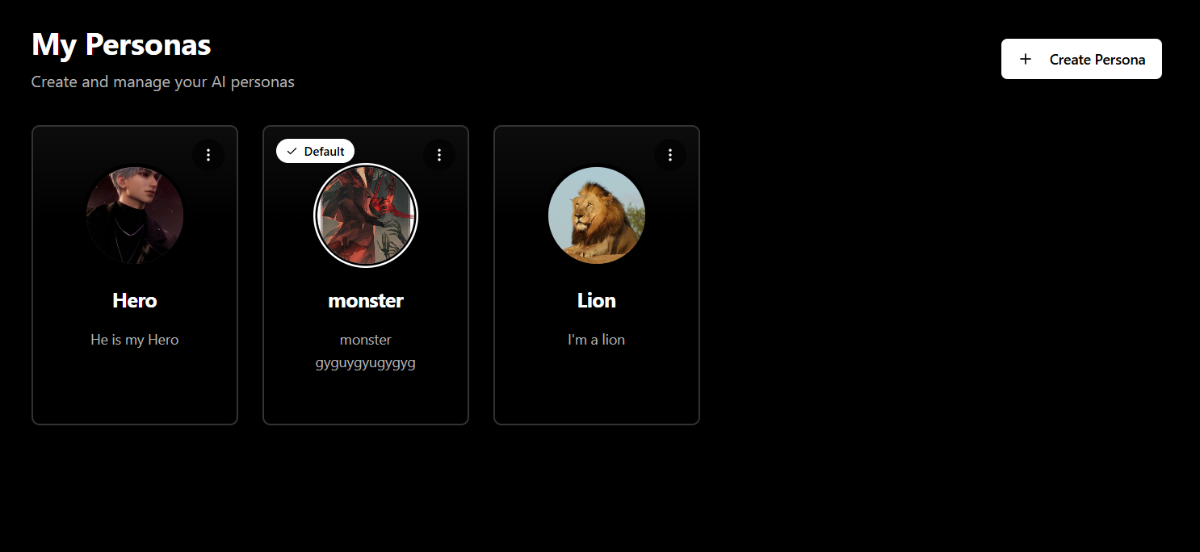
What are Personas?
Personas let you define your chat identity. Each persona can have its own name, description, and avatar.
- Use different identities for different chat scenarios
- Keep a consistent “you” across conversations
- Switch your default identity for new chats
Creating a Persona
To create a new persona:
- Navigate to the Personas page
- Click the "Create Persona" button
- Fill in the persona details:
- Name: The name of your persona
- Avatar: Upload an image representing this persona
- Description: Describe your persona
- Save your persona
Persona Creation Form
Create a new persona with custom name, avatar, and personality description
Using Personas in Chats
When starting a new chat, you can select which persona to use before sending your first message. After the chat starts, persona selection is locked for that conversation.
Persona Selection (New Chat)
Select a persona before sending the first message
Managing Personas
Set Default Persona
You can set one persona as your default. This persona will be automatically selected when you start new conversations.
Set Default Persona
Set Default action and Default badge on the persona
Editing a Persona
Click a persona card to edit its name, avatar, or description.
Edit Persona
Editing an existing persona
Deleting a Persona
To delete a persona:
- Go to your Personas page
- Find the persona you want to delete
- Click the three-dot menu and select "Delete"
- Confirm the deletion
Delete Persona
Delete confirmation dialog
⚠️ Warning
Deleting a persona cannot be undone. However, your chat history will be preserved.
Tips
- Use an avatar to quickly recognize personas
- Keep descriptions short and clear
- Set a default persona you use most often